Completing Your Property Information Questionnaire.
Introduction.
At Bayzos, we work with Street.co.uk to bring a modern approach to buying and selling property.
Through Street, you’ll have access to a mobile app and a desktop portal designed to make managing your property journey simple and stress-free.
You’ll also get instant access to any property updates, important documents and appointments.
This guide will help you set up your account and complete your Property Information Questionnaire (PIQ) quickly and easily. This ensures we have all the details about your property to market it effectively.
Logging In.
You’ve hopefully received an email inviting you to log in to your Street account. You can access the portal from any device using a web browser.
Prefer using your phone or tablet? You can download the app here:
Use the email address you use to communicate with Bayzos to log in — this will be the one we send any updates to.
If you’ve forgotten your password or it’s the first time you’re logging in, you can set a new password or reset yours here.
Your Dashboard.
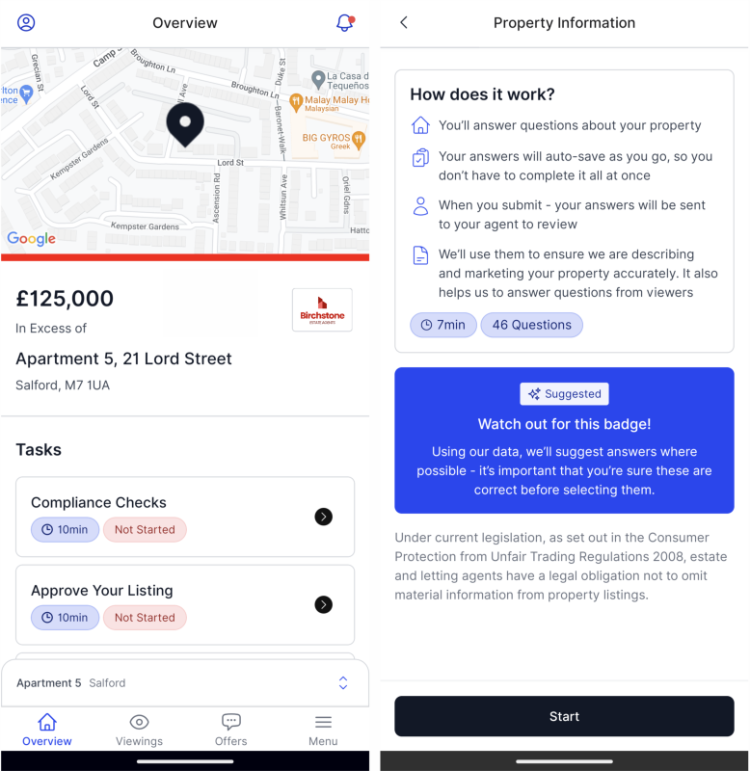
After logging in, you’ll see your property details and a “Tasks” section showing things you need to do, including your ‘Property Information’ Questionnaire (PIQ)
Select ‘Property Information’ and click the “Start” button to fill in the information requested.
Completing Your Questionnaire.
For each question, you can:
Use suggested answers from verified data in Street Insights - just click “Suggested”
Enter your own answers if you prefer
Each section has a progress bar so you can see how far along you are.
.png)
Need help? Click the question mark icon next to the question. Some questions may ask you to contact us if you need more guidance.
Tip:
If you have multiple owners on the property, only one person can submit the PIQ. Whoever starts first will have priority. Others will see a message explaining this.
.png)
Saving and Submitting.
You don’t have to complete the whole questionnaire in one go — your answers are saved automatically.
When you’re done:
Review your answers
Make any edits if needed
Click Submit
What happens next?
Once submitted:
Your answers feed directly into our system
We receive a notification and can update your property details
Your responses are accessible during property viewings, helping us provide potential buyers with accurate and information
If you need to make changes after submitting, contact the team so they can unsubmit it for you.
Need Help?
If you have any questions while completing your PIQ, you can always contact us. We’re here to help make this process as smooth as possible.
Final message from the founder.
We use Street so you can access everything related to your property transaction, without having to wait for someone to get back to you.
Our goal is to make the process as straightforward as possible for you and our team.
If you need any support with the app or online portal, please get in touch - we’re happy to help or create more resources where needed.
Thank you for reading:
Gary & The Bayzos Team
Disclaimer:
The information in this guide is provided for general information purposes only and does not constitute legal, financial, mortgage, tax, or professional advice.
While we aim to keep the information accurate and up to date, Bayzos Estate Agents Limited makes no guarantees or warranties regarding its accuracy or completeness.
You should always seek advice from a qualified solicitor, financial adviser, mortgage broker, accountant, or other relevant professional before making any decisions based on this information.
Bayzos Estate Agents Limited accepts no liability for any loss or damage arising from reliance on this guide.